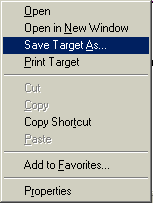
Download HelpOpening pdf filesFor your convenience, your ebook or report has been published for viewing in Adobe Acrobat Reader (as a .pdf file)... absolutely the best and easiest way to view the material on either a PC or Mac! To view it, you will need the free Adobe PDF reader. You probaby already have it installed on your computer. Mac users can use either Adobe Acrobat Reader or Preview to read pdf files. If you don't already have Adobe Acrobat Reader on your computer, or you need to upgrade it, left click here to get it for FREE or to upgrade (also FREE) ==> Get Acrobat Reader FREE (Note - clicking this link will open a NEW page in your browser.) Directions for DownloadingYour download links are on the download page you were directed to after purchase (not on this help page). Windows users may need to "Right mouse click" the on the download link. You'll see a menu like the one to the right open up. In Internet Explorer. Choose "Save Target As..." and download the file to your desktop (in Netscape you choose "Save Link As.."). Mac users just click on the download link and it will either be saved to your downloads folder or it may open in your browser so you can "Save As" to save it wherever you want. If you are still having trouble please don't hesitate to contact the HelpDesk for assistance.
|

 What
you need to do to download a file can vary according to what browser
and system you are using. Often all you need to do is click on the
link and it will download to your computer.
What
you need to do to download a file can vary according to what browser
and system you are using. Often all you need to do is click on the
link and it will download to your computer. 